✅Spring AI 记忆管理技术:持久化记忆 在Spring AI中,我们最熟悉的就是MessageWindowChatMemory ,它默认是一个基于内存的短期记忆实现,它维护最多指定最大大小(默认值:20 条消息)的消息窗口。
当消息数量超过此限制时,较旧的消息会被逐出。这确保对话始终可以使用最新的上下文,同时保持内存使用有界。应用一旦重启,内存中的记忆就会丢失。
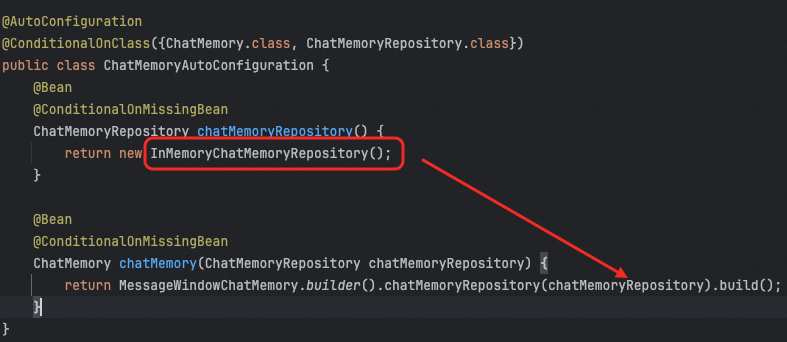
Spring AI中的记忆存储是基于ChatMemoryRepository这个接口扩展的,他提供了一些列实现用来做基于存储,包括前面的MessageWindowChatMemory所使用到的InMemoryChatMemoryRepository,这就是一种基于ConcurrentHashMap的本地内存的记忆方式。
这就是MessageWindowChatMemory的默认实现,除此之外,ChatMemoryRepository还有一系列扩展实现,我们也可以用,包括:
JdbcChatMemoryRepository
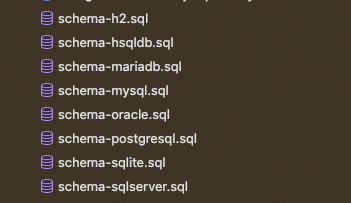
使用 JDBC 将消息存储在关系型数据库中,它支持多种数据库,PostgreSQL、MySQL / MariaDB、SQL Server、Oracle等
CassandraChatMemoryRepository
使用 Apache Cassandra 存储消息。它适用于需要持久化存储聊天记录的应用,特别是在需要高可用性、持久性、可扩展性,以及利用TTL功能时。
Neo4jChatMemoryRepository
使用 Neo4j 将聊天消息存储为属性图数据库中的节点和关系。它适用于希望利用 Neo4j 的图功能进行聊天记忆持久化的应用程序。
CosmosDBChatMemoryRepository
使用 Azure Cosmos DB NoSQL API 来存储消息。它适用于需要全球分布式、高度可扩展的文档数据库来持 久化聊天内存的应用程序。该存储库使用对话 ID 作为分区键,以确保高效的数据分布和快速检索。
MongoChatMemoryRepository
使用 MongoDB 存储消息。它适用于需要灵活的、面向文档的数据库进行聊天内存持久化的应用程序。
使用MySQL持久化记忆 我们借助Spring AI,使用Spring来做记忆保存,Spring AI提供了
1 spring-ai-starter-model-chat-memory-repository-jdbc
我们可以直接用它来实现。首先我们在代码中增加依赖:
1 2 3 4 5 <dependency > <groupId > org.springframework.ai</groupId > <artifactId > spring-ai-starter-model-chat-memory-repository-jdbc</artifactId > <version > 1.1.0</version > </dependency >
增加依赖后会自动引入这两个jar包:
1
2
spring-ai-autoconfigure-model-chat-memory-repository-jdbc spring-ai-model-chat-memory-repository-jdbc
一个是jdbc操作的工具包,一个是对他做自动化配置的。
通过org.springframework.ai.model.chat.memory.repository.jdbc.autoconfigure.JdbcChatMemoryRepositoryProperties 我们可以知道,都需要增加哪些配置项目:
1
2
3
4
5
6
7
8
spring: ai: chat: memory: repository: jdbc: platform: mysql initialize-schema: always
platform用于指定具体哪个数据库,他支持很多数据库,在platform和schema二选一进行配置就行了,就是指定用哪个表结构。
如果运行时还是提示没建表(initialize-schema: always 默认会自动创建表):
1
2
3
java.sql.SQLSyntaxErrorException: Table 'spring_ai_db2.spring_ai_chat_memory' doesn't exist at com.mysql.cj.jdbc.exceptions.SQLError.createSQLException(SQLError.java:121) ~[mysql-connector-j-8.0.33.jar:8.0.33] at com.mysql.cj.jdbc.exceptions.SQLExceptionsMapping.translateException(SQLExceptionsMapping.java:122) ~[mysql-connector-j-8.0.33.jar:8.0.33]
可以自己建个表,先创建一个数据库,然后建表一张,建表语句如下:
(不要用官方提供的SQL,会出现乱码和无法解析问题,就用我这个)
1
2
3
4
5
6
7
8
CREATE TABLE `spring_ai_chat_memory` ( `conversation_id` varchar(36 ) CHARACTER SET utf8mb4 NOT NULL, `content` text CHARACTER SET utf8mb4 NOT NULL, `type` enum ('USER' ,'ASSISTANT' ,'SYSTEM' ,'TOOL' ) CHARACTER SET utf8mb4 NOT NULL, `timestamp` timestamp NOT NULL DEFAULT CURRENT_TIMESTAMP ON UPDATE CURRENT_TIMESTAMP, KEY `SPRING_AI_CHAT_MEMORY_CONVERSATION_ID_TIMESTAMP_IDX` (`conversation_id`,`timestamp`) ) ENGINE=InnoDB DEFAULT CHARSET=utf8mb4 COLLATE=utf8mb4_general_ci ;
有了这些之后,还需要一个单独的配置,就是他这个东西要和数据库交互还需要一个datasource,我们需要有个数据库连接的能力,所以需要导入包:
1 2 3 4 5 <dependency > <groupId > mysql</groupId > <artifactId > mysql-connector-java</artifactId > <version > 8.0.33</version > </dependency >
增加数据库相关配置:
1
2
3
4
5
6
spring: datasource: url: jdbc:mysql://xx.xx.xx.xx/spring_ai_db2?useUnicode=true&characterEncoding=UTF-8 username: xxx password: xxx driver-class-name: com.mysql.cj.jdbc.Driver
接着就需要定义一个使用JDBC做记忆的ChatMemory:
1
2
3
4
5
6
7
8
public class JdbcChatMemoryConfiguration { @Bean ChatMemory chatMemory (JdbcChatMemoryRepository chatMemoryRepository) { return MessageWindowChatMemory.builder().chatMemoryRepository(chatMemoryRepository).build(); } }
然后在chatClient中使用这个memory:
1
2
3
4
5
6
7
8
9
10
11
12
13
14
15
16
17
18
19
20
21
22
23
24
25
26
27
28
29
30
31
32
33
34
35
36
37
38
39
40
41
@RestController @RequestMapping("/jdbc/memory") public class JdbcChatMemoryController implements InitializingBean { @Autowired private ChatModel chatModel; private ChatClient chatClient; @Autowired private ChatMemory jdbcChatMemory; @GetMapping("/callDb") public Flux<String> callDb (String message, String chatId, HttpServletResponse httpServletResponse) { httpServletResponse.setCharacterEncoding("UTF-8" ); return chatClient .prompt() .user(message) .advisors(spec -> spec.param(ChatMemory.CONVERSATION_ID, chatId)) .stream().content(); } @Override public void afterPropertiesSet () throws Exception { this .chatClient = ChatClient.builder(chatModel) .defaultAdvisors(MessageChatMemoryAdvisor.builder(jdbcChatMemory).build(), new SimpleLoggerAdvisor ()) .defaultOptions( DashScopeChatOptions.builder() .withTopP(0.7 ) .build() ).build(); } }
接着可以做两次对话:
第一次:http://localhost:8010/ai/long\_term\_memory/chat?chatId=12321&message=i%20am%20hollis
第二次:http://localhost:8010/ai/long\_term\_memory/chat?chatId=12321&message=who%20am%20i ?
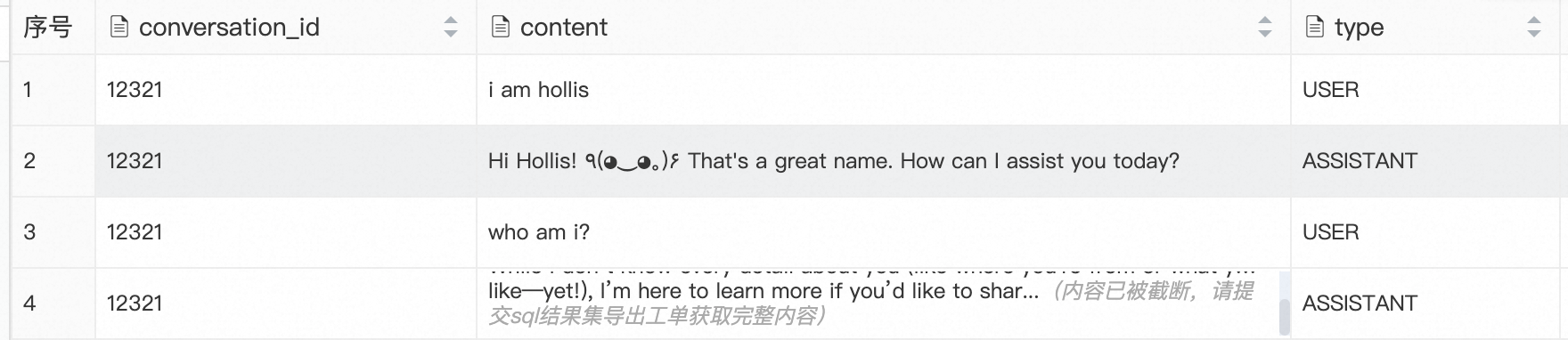
然后查看数据库,可以看到数据已经存下来了,
我们重启应用,在用同一个chatId问问题,他还是可以正常回答,历史的记忆还是存在的。