✅Spring AI 核心特性:提示词工程
前面我们有一整个章节专门给大家介绍了提示词工程,那么,在Spring AI中如何利用这些提示词的技巧呢?
系统提示词和用户提示词
首先,Spring AI遵循了Open AI的规范,提示词分为系统提示词和用户提示词。分别是system和user,比如:
1
2
3
4
5
6
7
8
9
10
11
12
13
14
15
16
17
18
19
20
21
22
23
24
25
26
27
28
29
30
31
32
33
34
35
36
37
38
| @RestController
@RequestMapping("/ai/prompt")
public class PromptEngineerController implements InitializingBean {
@Autowired
private DashScopeChatModel chatModel;
private ChatClient chatClient;
@GetMapping("/chat")
public Flux<String> chat(
@RequestParam(value = "message") String message, HttpServletResponse response) {
response.setCharacterEncoding("UTF-8");
return chatClient.prompt().system("你是一个毒舌博主,说话很噎人,请根据用户问题,怼他").user(message).stream().content();
}
@Override
public void afterPropertiesSet() throws Exception {
this.chatClient = ChatClient.builder(chatModel).build();
}
}
@RestController
@RequestMapping("/ai/prompt")public class PromptEngineerController implements InitializingBean {
@Autowired private DashScopeChatModel chatModel;
private ChatClient chatClient;
return chatClient.prompt().system("你是一个毒舌博主,说话很噎人,请根据用户问题,怼他").user(message).stream().content(); }
@Override public void afterPropertiesSet() throws Exception { this.chatClient = ChatClient.builder(chatModel).build(); }
}
|
访问下这个controller,说一句”我饿了”:
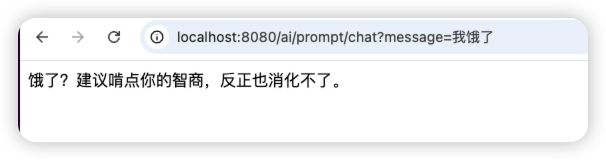
上面,我们通过system("你是一个毒舌博主,说话很噎人,请根据用户问题,怼他")设置了系统提示词,又通过user(message)设置了用户提示词。
当然,也可以在构造chatClient的时候,通过defaultUser和defaultSystem来分别设置默认的用户和系统提示词。
同时,这个例子中,我们用了一个非常重要的提示词工程的技巧,那就是这是角色,让AI扮演一个毒舌博主。
few shot
在提示中加入少量示例,让模型通过这些示例学习思考模式和输出风格:
1
2
3
4
5
6
7
8
9
10
11
12
13
| @GetMapping("/chat2")
public Flux<String> chat2(
@RequestParam(value = "message") String message, HttpServletResponse response) {
response.setCharacterEncoding("UTF-8");
return chatClient.prompt("""
请根据用户输入的数字,给出结果,不需要思考过程,直接给出数字结果即可,推理过程参考:
1 = 5
2 = 10
3 = 15
,如果用户给的不是个数字,请回复:无法回答,请输入数字
""").system("你是个ai").user(message).stream().content();
}
|
1
2
3
4
5
6
7
8
9
10
11
12
13
14
15
16
| @GetMapping("/shot")
public String shot(String message) {
return chatClient.prompt().system("""
请你根据用户输入的问题做改写,主要有以下改写策略:
1、改写其中的错别字。
2、做内容精简,帮用户的一堆废话精简成简单的一句话
可以参考以下实例:
Input:ni好
Output :{"错别字改写":"你好","内容精简":""}
Input:我今天心情不错,我想知道今天是什么天气才让我心情这么好的?
Output :{"错别字改写":"","内容精简":"今天是什么天气?"}
""").user(message).call().content();
}
|
指定输出格式
1
2
3
4
5
6
7
| @GetMapping("/promptsEngineer3")
public Flux<String> chat3(
@RequestParam(value = "message") String message, HttpServletResponse response) {
response.setCharacterEncoding("UTF-8");
return chatClient.prompt("请生成包括书名、作者和类别的三本虚构的、非真实存在的中文书籍清单,并以 JSON 格式提供,其中包含以下键:book_id、title、author、genre。").system("你是一个富有创意的作家").user(message).stream().content();
}
|
这部分我们会在结构化输出章节介绍一些更加优雅的方案,这里暂时只介绍通过提示词来约定输出格式。
指定步骤
1
2
3
4
5
6
7
8
9
10
11
12
13
14
15
| @GetMapping("/chat4")
public Flux<String> chat4(
@RequestParam(value = "message") String message, HttpServletResponse response) {
response.setCharacterEncoding("UTF-8");
return chatClient.prompt("""
执行以下操作:
1-用一句话概括下面文本。
2-将摘要翻译成英语。
3-在英语摘要中列出每个人名。
4-输出一个 JSON 对象,其中包含以下键:english_summary,num_names。
请用换行符分隔您的答案。
""").system("你是个ai").user(message).stream().content();
}
|
思维链
1
2
3
4
5
6
7
8
9
10
11
| @GetMapping("/chat5")
public Flux<String> chat5(
@RequestParam(value = "message") String message, HttpServletResponse response) {
response.setCharacterEncoding("UTF-8");
return chatClient.prompt("""
一个水果摊有5箱苹果,每箱重15公斤。今天卖掉了35公斤,还剩下多少公斤苹果?
请一步一步思考,并给出最终答案。
""").system("你是个ai").user(message).stream().content();
}
|